Feature
Notes

Configuration Tables

Data Sheet D2
(282kb PDF) s/w version 4c1

Wiring

History

Feature Notes

Datasheet


DHW Controller
with 3 x Triac Outputs

Latest released version is 4d1(beta 4dz)

Document last updated 11/11/2002
New features this issue are in
RED text

DHW / DIN / 3T / ...

Main Features

Controls DHW Temperature

Optimum Start Control

On-board outputs can drive Plant Locally

LPHW, Electric or Direct Gas Fired Calorifiers can be controlled

Pasteurisation/Sterilisation routine to kill bacteria

Summary Features

General

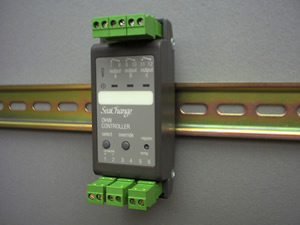
The SeaChange DHW Controller provides control of Domestic Hot Water services. The DHW module will control LPHW heated from a central Boiler system, or its own direct-fired Gas systems or Electric heating. These may have no association with the Wet Heating plant, but can share Occupancy Times with heating zones.
The DHW module is capable of automatic changeover from LPHW to Electric immersion heating in the summer.
Configuration parameters can be set to allow the DHW operation to match the plant control requirements. A full table of configuration and monitoring parameters is detailed later in this data sheet.
A table of available DHW product versions is shown on the last page.

Temperature Sensors and Volt-Free Inputs

The hot water temperature can be controlled by one or two sensors connected directly to the DHW Controller. Optionally one input can be used as a digital status for remote occupation control or alarm input purposes.

Valve Control

The DHW module directly controls a raise/lower or motor-open/spring-closed valve.
An Actuator Submodule ACT/DIN/AOP/... can be used for applications where the DHW valve requires a 0 -10Vdc control signal.

Secondary Pump Control

The DHW module directly controls a single pump using Occupation Switch output C.
An Actuator Submodule ACT/DIN/3T/... can be used to control a pump for applications where all three DHW outputs are used for heating.
A Changeover Submodule PCO/DIN/3T/... can be used for applications where the DHW secondary has a pair of pumps.Control of Immersion Heater
A version of the DHW Controller is available that will control an Electric Immersion Heater as well as an LPHW valve. The Immersion Heater will be used when the Boilers are not running (either because no Space Heating is required, or perhaps because they are undergoing maintenance). The Immersion Heater may also be used to provide a boost to aid DHW temperature recovery when the Boilers are unable to cope with the load of Space Heating and Hot Water generation.

Description of Features

Time Control

A SeaChange Zone Controller must be used to set the operating times for the DHW Controller. This may be the same Zone Controller that is being used to control the building/space heating, or some other function. Alternatively a separate dedicated Zone Controller may be used to provide the DHW operating times if they differ from the building/space heating times.
The available methods of interconnection are described as follows. There are three types selectable by configuration parameter SPTY.

Occupancy times from a single Heating Zone

The DHW can be driven by the Time Schedule of the Master Zone Controller using SPTY = 0 (default). The DHW has its own Optimum Start control (see later section). The Master Zone may be used for other systems functions and control.

Occupancy determined by multiple Zones

The DHW can be driven from one or more Zone Occupation Demands using SPTY = 2. The DHW runs only when any of the calling demands is present, and does not have its own Optimum Start.

Dedicated Zone Controller

The DHW can be driven by the Setpoint of a Master Zone Controller using SPTY = 1. The DHW runs when the Zone Controller is in Occupancy or Optimum Start. The Zone controller can be configured to set the DHW setpoint from its adjustment knob, and display the DHW temperature using the remote process variable feature (remote PV). In this dedicated application, the Zone Controller cannot be used for space temperature control as well as DHW.

Optimum Start/Stop

The DHW has its own start and stop optimisation control used only when SPTY = 0. This is based on the occupation times provided by the Zone, with the ability to provide local timing offsets using the AJST and AJSP parameters. These can be useful when DHW times need to start earlier or stop later than the heating zone times eg: for cleaners, kitchens etc.
The optimised start and stop times can be limited by monitoring parameters MXOS and MXOF.
The Optimum Start feature may be disabled by setting OCCO = 1; this means that the pump will remain off and valve will remain closed until the start of Occupancy.

Demand Interconnects

Connections to Zone controller and up to 8 optional submodules are achieved by interconnect registration. The process is described in our ‘Design Guide’ publication.

Heating Demand Interconnects

There are three methods of interconnecting DHW demands to boilers. The Boiler controller can discriminate between Zone controller demand (% = VT demand, compensation etc) and secondary circuits requiring CT (Deg C).

DHW registered to a Boiler module

When registering the heat demand interconnect direct to a Boiler Controller, set the desired CT setpoint with parameter HTCT in DHW controller (default = 70 Deg C).

DHW registered to a Secondary Circuit Controller with Temperature Control

When registering the heat demand interconnect via a Secondary Circuit Heating Controller, set the HTCT parameter in the DHW controller to 0. Set the desired CT setpoint with the Secondary Circuit controller’s parameters MAXF plus LOSS, and set the HTCT parameter to 1.

DHW registered to a Secondary Circuit with Pump Changeover

When registering the heat demand interconnect via a Secondary Circuit Pump Changeover Controller, set the HTCT parameter in the DHW Controller to 0. Set the desired CT setpoint with the Secondary Circuit Controller’s parameter MXCT, and set the HTCT parameter to 1.

Submodule Interconnects

Up to 8 submodules (of any type using the generic Control Demand interconnect) may be registered to a DHW Controller.

Temperature Sensors and Inputs

Depending on the application, one or more sensors can be used for temperature control. The standard tank temperature sensor is connected to input ‘temp’ on terminals 5 and 6. The optional input on terminals 3 and 4 can either be used for a top of tank temperature sensor or alternatively a VFC input. The behaviour of the two inputs are configured by parameters SACT and INMD

Tank Sensor and Top of Tank Sensor

Input 3-4
Top of Tank / additional Sensor
Input 5-6
Tank Sensor
INMD = 0
 
SACT = 0
Control on tank sensor only
Top of Tank sensor for monitoring or high limit (using SPMX parameter)
SACT = 1
Control on average of two sensors
SACT = 2
Control on maximum of two sensors
SACT = 3
Control on minimum of two sensors

Tank Sensor and external Control Status input

Input 3-4
External occupancy VFC input
Input 5-6
Tank Sensor
SACT = 0
 
INMD = 1
Occupancy determined by Time Schedule AND external i/p Use for Interlock with high limit stat
INMD = 2
Occupancy determined by Time Schedule OR external i/p Use for external occupancy override
INMD = 3
External occupancy signal only Use for external timeclock control where no Zone controller used

Tank Sensor and external Alarm Monitor input

Input 3-4
External monitor / alarm VFC input
Input 5-6
Tank Sensor
SACT = 0
 
INMD = 4
Monitor Input if ALRM = 0
Alarm Input if ALRM > 0
INMD = 5
Pump readback monitor
Generates alarm if no status readback from pump (via DP switch etc ) within 30 secs (set ALRM > 0)
ALST = 0
0 = Alarm State, 1 = Normal
ALST = 1
0 = Normal, 1 = Alarm State

Sensor calibration

The resultant control sensor value (Tank sensor input alone, or Tank and Top of Tank sensors combined as set by SACT) can be adjusted by calibration parameter SCAL

High Temperature Limit

A configuration setting SPMX allows a high limit to be put on the DHW water temperature, this will shut down the DHW control if the high limit is exceeded by either of the temperature sensors. This feature is useful where an immersion heater is used in systems with no secondary or anti-stratification pumps, as dangerously high temperatures can build up at the top of the tank. The feature also prevents excessive temperatures if the controller is left in Manual Override.
The high limit feature is enabled by setting SPMX to the required high limit temperature. A value less than 5.0 disables the feature. A second sensor should be fitted, at the top of the tank or on the DHW flow pipe, so that if the highest sensor exceeds SPMX then the DHW controller will be shut down until the temperature drops by 2 degrees. Input I5 HILM reports the state of the HIgh LiMit. The high limit sensor can be monitored on sensor 7 HWT2.

Control of DHW Heating Valve

The configuration parameter VMDE can be set to override the DHW valve. The setting of 0 will keep the DHW valve closed until boiler flow temperature is greater than current DHW temperature. The setting of 2 is designed for systems where the DHW is heated from a Variable temperature circuit as well as electric immersion. If the VT temperature is higher than the DHW temperature it is used, otherwise the water circuit is closed and the Electric heater used. Set heat source HTSC to zero for this option, as it is not appropriate for the DHW demand to influence the Boiler Controller. The default value for VMDE is 1 where the value of the boiler flow temperature is ignored.

Control of Immersion Heater

The Immersion heater will be used in preference to the DHW heating coil when the Outside Temperature is above the SUMR Summer Temperature AND the flow temperature from the appropriate heat source is below the Low Flow temperature LOFL. The immersion heater is also used to ‘boost’ the DHW recovery time. If after 15 minutes the Boiler Flow Temperature is not higher than the DHW Temperature and the DHW control is still calling for maximum heat, then the Immersion heater is enabled as well as the heating coil. These features will only operate correctly when the heat source receiving DHW demands (i.e. Boiler Controller or Secondary Circuit Controller) has a valid flow temperature.

Frost Protection - Secondary side

If the DHW measured temperature falls below the non-occupied setpoint then the controller becomes 'occupied'. The controller remains in this mode until the temperature has risen by the amount specified by the parameter FRSE, at which point the controller reverts to non-occupied. If FRSE is set to zero, the controller will control to the non-occupied setpoint SPNO.

Frost Protection - Primary side

The DHW Controller can be made aware of the Frost protection status of the Boiler controller. If the Boiler controller is in Frost Protect this is communicated to the DHW controller which will open the heating valve to 50% (to primary coils and bypass) and run the pump if desired, as set by the parameter FRPT.

Pump Control Interlock

When a single pump is driven from the occupation output, INMD = 5 and ALRM = 2 or 3, the control outputs are disabled if the pump readback signal goes into alarm. The pump remains disabled until the readback signal is fixed, the Override button is pushed or the ALRM parameter is set to zero.

Pump Time Interlock Settings.

The pump can be set to run at a different time to the heater. The pump start can be delayed after the heater has started, or the pump can be made to run on after the heating output shuts down by configuring the parameter HDLY. Negative values for HDLY will start the pump the defined number of minutes after the heating driver has been enabled, positive values will cause the pump to run on after the heating driver shuts down.

Supplied Water Temperature

When controlling an immersion heater as well as a heating coil the controller needs to know what temperature water is being supplied. The controller will read this temperature from it's heat source, however if this is a Secondary PumpChangeover controller then it will not have a temperature to read. In this case set configuration variable USEB (USE Boiler) to force the controller to use the Flow temperature from the main boiler for this function.

Pasteurisation of Stored Water

The warm water stored in the Calorifier can be a breeding site for Legionella and other bacteria. The UK Public Services require that hot water is either stored above 65 °C or that the storage vessel and associated pipework is heated to 65 °C or above for 90 minutes every week. The DHW controller provides this facility as an optional feature. The following table details the parameters which need to be set to activate the Pasteurisation Procedure.
Parameter ref
Mnemonic
description
units
default
range
C173
PTDW
Pasteurisation Day:day of week for pasturisation, monday 1: sunday 7
day
0
1 to 7
C174
PTST
Pasteurisation Start Time, 24 hour clock set to nearest tenth of an hour
hours
0.0
0.0 to 24.0
C175
PTPD
Pasteurisation Period: time in hours for which the water temperature needs to be pasturised
must be non zero to activate pasturisation
hours
0.0
0.0 to 4.0
C176
PTSP
Pasteurisation Temperature
must be non zero to activate pasturisation
°C
0
0 to 90
C177
PTOK
Pasteurisation completed correctly
-
0
read only
The pasturisation period is only counted while the temperature is within 5 degrees of the pasturisation setpoint. If the pasturisation temperature is not acheived the routine will time out after twice the pasturisation period. The parameter PTOK Pasteuristion Completed provides confirmation that the pasteurisation completed correctly, this parameter remains set for two days after the pasturisation event.
If ALRM Alarm Mode is set then the controller will generate an alarm message if the Pasteurisation cycle is started but does not complete correctly, the alarm is reset at the same time as the Pasteurisation Completed PTOK flag is cleared.
A software switch W3 PTRN provides an indication that the Pasteurisation Procedure is running. If the switch is set to zero while paturisation is in progress then the Pasteurisation Procedure is terminated. The switch can be used to force a Pasteurisation cycle by manually setting it to ON. If Pasteurisation is not completed within 4 hours of setting the switch the Pasteurisation cycle is automatically cancelled.
WARNING- HEALTH & SAFETY
Automatic pastuerisation of the DHW means that water temperatures will exceed recognised safe limits for use in sinks and showers, which do not have downstream automatic blending valves fitted, for many hours during and after the Pasteurisation cycle has completed. This feature must only be activated where sufficient time for cooling is available, e.g. weekday use only; or where downstream automatic blending valves are used to protect the users from scalding.
smartKontrols cannot be held responsible for injuries resulting from the misapplication of this feature.

Alarm Handling

The DHW Controller may be set to ignore alarm conditions, report them to a SeaChange Doorway Supervisor (either locally connected to the system, or via an autodialling modem), or to both report alarms and take some control action. The ALRM parameter is used to select the desired Alarm Mode.
The DHW Controller generates an alarm if the sensor fails and also if the external alarm input is used. The sense of the alarm input can be set by parameter ALST.
The DHW Controller may be set to respond to the STOP System Stop Alarm which is generated by a Boiler Controller; this can be used to shut down the entire control system, or parts of it, if a particularly critical event occurs. See Boiler Controller datasheets B1 or B2 for more details about the System Stop Alarm.
Alarm codes as they appear at Doorway Supervisor and InSite tool:
NOAL
No Alarms.
All alarm conditions cleared in this Module.
SENF
Sensor Failed.
RPVF
Remote Process Variable Failed.
Not used in this module.
EXTN
External alarm generated by VFC input.
PMPF
Pump Fail (readback alarm) generated
by VFC input (INMD = 5).
STOP
System STOP alarm received.
All outputs shut down if ALRM = 3 or 4.
PTCF
Pasteurisation Cycle Failed

Local Indication of Alarms

Alarms are indicated by red flashing of the Temperature Indicator (Thermometer) LED, if the alarm results in a control action (e.g. shutting down the pump/valve). If ALRM is set to 0 (ignore alarms) or 1 (report alarms to supervisor only) then no control action will be taken, and the thermometer LED will not flash.

Commissioning

Setup Mode : Timing Characteristics of Output Channels

It is possible to set the stroke time (for Raise/ Lower type Actuators) and the minimum on/off time (for Time Proportion type Actuators) using pushbuttons.
Raise/Lower Types - Setting Stroke Time
  1. Hold down Select until Temp lamp flashes
    Temperature indicator will flash red at one second intervals.
    Release select button; output B will energise to close valve.
  2. When valve is closed press Select
    Temperature indicator will flash green and output A will energise to open valve. The controller is now measuring the stroke time.
  3. When the valve is open press Select
    Flashing will stop and stroke time is now set and stored in non-volatile memory. This time will be retained until the procedure is repeated.
Note: if a Stroke Time of less than 30 secs is set using pushbuttons then the setup process is aborted. Temp indicator flashes amber rapidly for 5 secs indicating an invalid period. This allows checking of wiring without affecting Stroke Time setup. Stroke Times less than 30 secs can be entered manually via Zone Controller or InSite tool.
TP Types - Setting Minimum Time On/Off
  1. Hold down Select until Temp lamp flashes
    Temperature indicator will flash green at one second intervals and relay A will energise.
    Release select button.
  2. When minimum on/off time has elapsed, press select
    Flashing will stop and this time will be set and stored in non-volatile memory. This time will be retained until the procedure is repeated.
    Note that the full TP period will be 10 times this value.
The times can also be viewed and changed using parameters HPRD (heating) and CPRD (cooling).

Manual Override

Allows the outputs to be exercised during comm-issioning and maintenance activities. Holding the override button pressed until the Status Lamp flashes green will cause the controller to be switched from automatic control to Override Mode. Subsequent pressings of the manual override button will cycle through the available Override modes.
  1. Hold down Override until Status lamp flashes
    Controller changes to Override Mode and becomes Occupied, controlling to current Occupied Setpoint.
  2. Press Override again
    Controller changes to Manual Mode and output is set to 100%, temperature lamp shows red.
  3. Press Override again
    Controller cancels Manual Override and reverts to automatic control.
As this feature does not time out, care should be exercised to ensure the module is returned to the automatic mode on completion of the commissioning or maintenance activities.
Occupancy Override can also be achieved via Doorway and InSite; using AUTO and OVRD monitoring parameters. The status lamp indication shows a different sequence.
Override from Off to ON : Status lamp flashes long ON, short Off
Override from ON to Off : Status lamp flashes long Off, short ON
See our ‘Design Guide’ publication for details of the Override features.

Hand Control

The DHW controller like a Zone Controller uses the AUTO and OVERRIDE switches to control the Occupancy state which prevents MANUAL control of the outputs from Doorway. A new control mode has been added which allows Doorway to select MANUAL, this is activated by setting switch 5 HAND. The forces the controller to manual mode and the output is defined by the value on the config variable MANL. On this controller only 0 to 100% has significance because the DHW controller only has heating. The process of selecting HAND and setting the manual level can be associated on the same point by using the following Doorway syntax.
[Z1]W5(S)/hand/auto/12/10/C83(V)  assumes the controller is Zone 1.
Clicking on the point allows selection of hand or auto and also the means to set C83 which is the manual level required.

Registration

Registration is the simple process by which logical connections are made between Controllers in a SeaChange system; it is done during commissioning and involves pressing buttons on the Controllers in a specific sequence.
For further details of the registration process, see our ‘Design Guide’ publication.

Address Allocation and System Housekeeping

Like all SeaChange Controllers, the DHW Controller must be registered with other modules in order to create a working system. During the Registration procedure, the address of each Controller is allocated by the module that contains System Housekeeping. Check that you have an appropriate System Housekeeping Module; see our ‘Design Guide’ publication.

Interconnects

The DHW Controller must receive signals from a Zone Controller, either Time Schedule Supervision, Setpoint Supervision, or Occupancy Demand signals (see Time Control section). It may also send signals to other modules (e.g. a Changeover Submodule when the DHW secondary circuit has a twin pump set).
These Interconnects are put in place by Registration; again, see our ‘Design Guide’ publication.

Options and Product Codes

Domestic Hot Water Controller Module

DHW / DIN / 3T / [driver option]

Driver options

Option

Output A

Output B

Output C

/ 101
Time Proportional Heat
Not used
Occupation Switch or
Optimum Start Switch
/ 105
Valve Open
Valve Close
Occupation Switch or
Optimum Start Switch
/ 108
Sequence 2 triacs at 33% and
66% of demand
Occupation Switch or
Optimum Start Switch
/ 109
Sequence 3 triacs at 25%,
50% and
75% of demand
/ 110
Time Proportional Heat
Immersion Heater
Occupation Switch or
Optimum Start Switch
/ 111
Valve Open
Valve Close
Immersion Heater


Input Configuration

Input 3-4
DHW Top Sensor (optional)
or VFC status / alarm / occupancy
Input 5-6‘temp’
DHW Sensor


smartkontrols Ltd
8 Horsted Square
Bell Lane Business Park
Uckfield East Sussex
TN22 1QG
phone 01825 769812
fax 01825 769813
e-mail sales@smartkontrols.co.uk
http:// www.smartkontrols.co.uk